I Self-Hosted MiniMax H3 on an L40S: What Is Actually Open
MiniMax H3 runs on a 48 GB L40S with INT8 weights, but H3-Base is only the middle stage. Here is what worked, what failed, what it cost, and when self-hosting wins.

Verdict: MiniMax H3 does run on a 48 GB L40S, and the open weights are unusually capable: 768p video, stereo audio, first/last-frame conditioning, multiple references, and optional structural control. But the release is not the complete system shown in the official demos. The downloadable H3-Base weights cover the middle generation stage; the hosted Context-IR stage before it and 2K regeneration stage after it still matter visibly.
That distinction changed my buying decision. For occasional polished clips, I would use the API. For a steady private workload, video-to-video batches, or experiments that need sampler and ControlNet controls, I would self-host. I would not expect the open weights alone to reproduce the official demo finish. This is the same reason I keep generation cost separate from retry and access costs in my Seedance 2.5 hands-on test: the cheapest successful render is not necessarily the cheapest publishable clip.
Lab card — Test date: September 7, 2026. Model/version: MiniMax H3, pruned INT8 ComfyUI packaging available at the time of testing. Tested on: AWS
g6e.4xlarge, one NVIDIA L40S with 48 GB VRAM, inap-northeast-1; ComfyUI bound to localhost and reached through SSM port forwarding. Representative job: 1344×768, 124 frames, 8 steps, 5.17 seconds of output in about 210 seconds for the first/last-frame experiment. What I paid: self-funded; the instance ran for 8.5 hours. At the Tokyo on-demand rate I recorded—$4.357/hour—that is about $37.03 in compute, plus prorated EBS storage. No sponsorship or affiliate links.
What Is Actually Open#
The phrase “open-source H3” hides three different products:
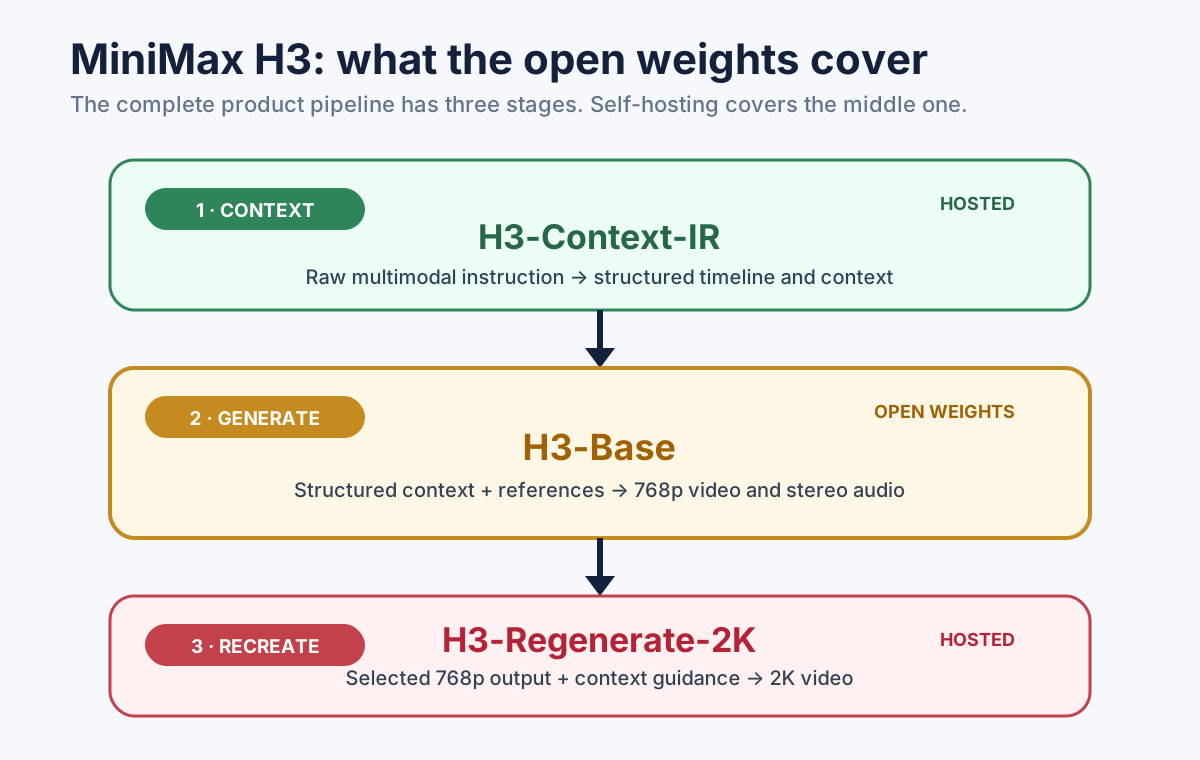
Figure 1: the H3-Base weights are real and useful, but they are the middle of a larger production pipeline.
- H3-Context-IR reads the instruction and references, then rewrites the request into structured context with timing and shot information.
- H3-Base generates the 768p video and stereo audio. The downloadable H3-Base weights contain this 33B dense, single-stream backbone.
- H3-Regenerate-2K takes selected output and context guidance and recreates it at 2K. This is not merely a local super-resolution pass.
One correction matters here. Some early setup notes said the “Fun ControlNet” or model patch was missing. That is no longer accurate: the Comfy-Org/MiniMax-H3 package includes a model_patches/ directory. Structural control is available to a self-hoster. What remains outside the base-weight release is the separate Context-IR and 2K regeneration path.
The license also deserves precise language. This is not Apache-2.0 or MIT; it is the MiniMax H3 Community License. I am not offering a legal interpretation here. Read the linked license and any access terms that apply to your account and region before commercial use.
Why I Used a 48 GB L40S#
My first choice was g7e.4xlarge: one RTX PRO 6000 Blackwell with 96 GB would fit the roughly 66 GB BF16 backbone much more comfortably. I could not get capacity in the regions and Availability Zones I tried, so I fell back to g6e.4xlarge with a 48 GB L40S.
That forced one important compromise: the 19.5 GB pruned INT8 backbone instead of BF16. It runs, but 768p INT8 output is visibly thinner than the official material in skin texture, fine snow, and small facial details.
The frame count also is not arbitrary. Valid counts follow 17k + 5; 124 frames is 17 × 7 + 5. The practical range documented in the workflow I tested was 124–362 frames. A 124-frame clip came out to 5.17 seconds in this setup.
The Prompt Experiment That Exposed Context-IR#
I used the same first frame, last frame, seed, eight steps, and 5.17-second duration for three runs. The scene was a reverse-angle exchange in a snowy bamboo forest: a woman in the opening frame, then a man in the closing frame.
- A — conversational Chinese prompt: I fed the model the original natural-language instruction.
- B — hand-written structured context: I rewrote the same intent in the format described by the official prompt guide and pinned the cut to
00:02.583. In effect, I manually performed the missing Context-IR stage. - C — the same structured prompt, but no first or last frame: this isolated what the text structure controlled from what the visual references controlled.
The result was more informative than a beauty comparison:
| Run | Edit structure | Identity and grade | What happened |
|---|---|---|---|
| A: natural language | Failed | Held | The woman left frame, the model produced about one second of empty bamboo forest, then the man entered. It interpreted “reverse-angle cut” as blocking. |
| B: structured context | Held | Held | The shot changed cleanly at 2.583 seconds, with the woman present before the cut and the man present immediately after it. |
| C: structured, no endpoint frames | Held | Failed | The cut remained, but the people, hair ornaments, clothes, and color grade drifted. |
My reading is simple: structured context controls the edit; reference frames lock identity and look. Context-IR is not decorative prompt polishing. It translates a human request into a representation the base model follows much more reliably.
The good news is that this stage is replaceable. I wrote the structured context by hand; another multimodal model could read the reference images, understand the intended edit, and emit the same format. It is careful preprocessing, not inaccessible magic. The bad news is that it is still work the open H3-Base checkpoint does not perform for you.
The Deployment Traps That Cost Me Time#
1. Two repositories, only one convenient for ComfyUI#
The two Hugging Face repositories solve different problems:
| Repository | Size during my test | Layout | Use it for |
|---|---|---|---|
MiniMaxAI/MiniMax-H3 | about 498 GB | diffusers-style | SGLang/vLLM-oriented deployment |
Comfy-Org/MiniMax-H3 | about 90 GB | ComfyUI-compatible single-file weights | ComfyUI workflows |
On my first machine I downloaded 255 GB from the official repository before realizing ComfyUI could not load that layout. With hf_transfer, the correct 90 GB package took about 13 minutes.
2. Use native INT8 on Ada, not emulated NVFP4#
The ComfyUI template offered an NVFP4 text encoder to save memory. The startup log told the more important story:
Emulated ops: mxfp8, nvfp4L40S is Ada, so those NVFP4 operations were emulated rather than native. I chose the INT8 encoder instead: roughly 11 GB more VRAM, but native execution. NVFP4 is a more natural choice on hardware that implements it directly.
3. The compiler error was not solved by “use less VRAM”#
Adding structural control initially failed with an aimdo memory compile error. Before generation, reported allocations were already around 41.7 GB; asking for another 2.2 GB looked like a plain OOM. It was not the whole story. ComfyUI’s newer memory compiler did not support the operator combination in this workflow.
The decisive workaround was:
python main.py \
  --listen 127.0.0.1 --port 8188 \
  --disable-smart-memory --reserve-vram 1.0 \
  --disable-comfy-compiler
With the compiler disabled, the workflow stabilized and the observed peak fell to roughly 28 GB. Reducing VRAM pressure alone did not explain or fix it.
4. Add the model-patch path explicitly#
If the patch is stored outside ComfyUI’s default tree, extra_model_paths.yaml needs the directory:
minimax_h3:
  base_path: /opt/models/minimax-h3
  diffusion_models: diffusion_models
  text_encoders: text_encoders
  vae: vae
  model_patches: model_patches
Without model_patches, the files can be present on disk while the workflow still cannot find the control component.
5. Local NVMe is fast; EBS survives a stop#
The instance includes about 940 GB of local NVMe, but instance-store data disappears when the instance is stopped. I kept the model on a 1 TB gp3 root volume instead. After stop/start, the roughly 92 GB model set was intact and ComfyUI was ready in about five seconds.
The trade-off is a storage bill while compute is stopped. My test volume was provisioned at 16,000 IOPS and 1,000 MB/s, which the estimate at the time put around $216/month. Default gp3 throughput is 125 MB/s; reading roughly 45 GB of weights at that rate can turn model loading into a multi-minute wait. Persistent storage is convenient, but it can erase the savings of an occasional-use deployment.
6. Do not expose ComfyUI to the internet#
ComfyUI has no authentication boundary suitable for a public endpoint. It can read local files, run Python through nodes, and consume the GPU attached to your cloud account.
My instance had zero inbound security-group rules, no SSH key, and ComfyUI listening only on 127.0.0.1. I reached port 8188 through AWS Systems Manager port forwarding. Opening 8188 to the world is not a shortcut; it is remote code execution and cost exposure waiting to happen.
Performance: Three Numbers, Not One Benchmark#
I recorded several timings, and they should not be collapsed into a single headline number:
| Workflow | Output | Time | Scope |
|---|---|---|---|
| First/last-frame structured-context test | 1344×768, 124 frames, 8 steps, 5.17 s | about 210 s | The reproducible A/B/C experiment described above |
| Text-to-video run | 124 frames | about 160 s | Later measurement with a different workflow/configuration |
| Structural-control run | 124 frames | about 200 s | Later measurement with the model patch enabled |
The spread reflects workflow and configuration differences, not random benchmark rounding. If you are budgeting throughput, measure your own graph after warm-up and include model-loading, failed runs, and inspection time.
That last point dominated my bill: the instance was up for 8.5 hours, but only about three hours were productive generation. The rest went to downloading the wrong weights, correcting paths, changing launch flags, and reviewing output. First-run cost is not steady-state cost.
Cost: The Break-Even Point Is Utilization#
The following is a dated model, not a live price quote. On September 7, 2026, I recorded g6e.4xlarge at $3.0042/hour in us-west-2 and $4.357/hour in Tokyo. I also recorded the hosted 768p rate used in the original comparison at $0.08 per output second. Check the linked pricing pages before making a purchase decision.
At the us-west-2 rates:
- API cost for 5.17 seconds:
5.17 × $0.08 = $0.41. - Self-hosted compute for a 160-second run:
160 / 3600 × $3.0042 = $0.13. - Break-even output per GPU-hour:
$3.0042 / $0.08 = 37.6 seconds. - Maximum output at that run rate:
3600 / 160 × 5.17 ≈ 116 seconds/hour.
So the GPU has to be generating useful output about one-third of the time before the us-west-2 compute line beats that API rate. Tokyo’s 45% higher compute price pushes the threshold toward one-half, and persistent EBS, retries, input-video billing, setup time, and idle time move it again.
This is why “$0.13 versus $0.41” is the wrong conclusion. The correct conclusion is below. For the delivery side of the budget, the video bitrate calculator converts the chosen resolution, bitrate, and duration into bandwidth and storage rather than generation cost.
- Bursty, low-volume work: the API turns idle infrastructure and setup hours into someone else’s problem.
- Sustained batches: self-hosting wins when the GPU stays busy, especially for video-to-video work where hosted products may meter both processing and output duration.
- Private or highly controlled workflows: economics may be secondary to keeping media inside your environment and exposing sampler, strength, end-percent, and structural-control settings.
My Decision#
MiniMax H3’s open release is both less complete and more useful than the marketing shorthand suggests.
It is less complete because H3-Base is not the full demo pipeline. Prompt interpretation and final 2K recreation are precisely the stages that separate “the model understood my rough idea” from “this looks ready to publish.” A hybrid workflow—self-host 768p drafts, then regenerate only selected shots at 2K—can be rational, but it is still hybrid.
It is more useful because the base weights expose controls an API usually hides. For a production line doing repeated redraws, a private media workflow, or research that needs to tune structural-control strength and timing, that access is the product.
My rule after running it myself:
- Low volume, highest finish, least maintenance: use the hosted API.
- Stable high volume, private inputs, or parameter-level control: self-host the INT8 package and keep the GPU busy.
- Trying to reproduce the official demo with open weights alone: lower the expectation. The downloadable checkpoint is only the middle stage.
The most valuable result of this experiment was not that I got a clip out. It was learning exactly where the open boundary sits—something the word “open” cannot tell you until you turn on the machine and run the entire path.
References
- MiniMax-H3 model repository — MiniMax AI on Hugging Face
- MiniMax H3 Community License — MiniMax AI on Hugging Face
- ComfyUI-compatible MiniMax H3 weights — Comfy Org on Hugging Face
- Amazon EC2 G6e instances — AWS
- Amazon EC2 On-Demand pricing — AWS
Frequently asked
Can MiniMax H3 run on a 48 GB L40S?
Is the complete MiniMax H3 product open source?
Which MiniMax H3 repository should ComfyUI users download?
When is self-hosting cheaper than the API?
Read next
- Video Streaming
VOD Deep Dive Part 12: Building VOD on AWS — Services, Architecture, and Costs
Complete AWS VOD reference: MediaConvert, MediaPackage, CloudFront, S3, Step Functions, SPEKE DRM integration, Terraform IaC, real cost breakdowns, common pitfalls, and a production roadmap.
- AI & Agent
Seedance 2.5 Hands-On: 725 Credits Buy 27 Seconds, and the CLI Costs Extra
A ¥69/month membership buys 725 credits — enough for 27 seconds of finished video, about ¥2.5 per second. The Dreamina CLI needs the ¥998/month premium tier, which is where my agent-driven pipeline stopped. Three blockers, one cost calculation done on what I actually paid, and four things wrong with the subtitles.
- Cloud Architecture
5 Pitfalls of Logging Failed Requests with CloudFront + Lambda@Edge
We built a dual Lambda@Edge setup for full request logging on CloudFront. Here are the 5 things that went wrong.
- Coding Tools
Building an Enterprise Agentic AI Platform with Kiro and AWS
We built a full AI agent platform in one week using Kiro IDE — zero hand-written code. Here's exactly how, including the parts that needed rework.
Get new posts by email
One email when a new article goes up. No ads, unsubscribe in one click.
Your address is used for post notifications only.
Discussion
Comments are GitHub Discussions on this repository; sign in with GitHub to post.