Big Data on AWS Deep Dive (Part 3): Data Ingestion — DMS, Zero-ETL, Firehose, and MSK
Four data sources, four ingestion pipelines — learn CDC with DMS, Aurora Zero-ETL, Kafka on MSK, and Firehose micro-batching to land data into your S3 data lake.
The core question in our customer scenario: MySQL, DocumentDB, Elasticsearch, and client-side event tracking — how does each data source land in S3?
This chapter covers four ingestion pipelines and the 7 AWS services involved (DMS, Zero-ETL, OpenSearch Ingestion, Firehose, MSK, KDS, and Lambda).
The Big Picture#
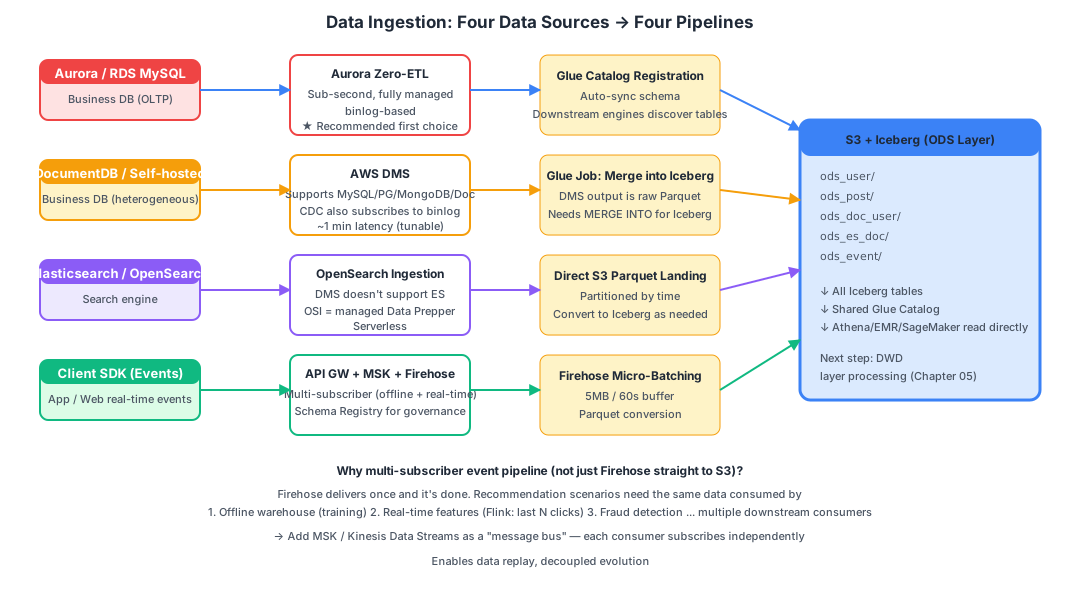
Four data sources map to four ingestion pipelines:
| # | Data Source | Recommended Pipeline | Why |
|---|---|---|---|
| 1 | Aurora / RDS MySQL | Zero-ETL to SageMaker Lakehouse | Sub-second latency, fully managed, AWS-recommended |
| 2 | Self-hosted MySQL / DocumentDB | DMS to S3, then Glue merges into Iceberg | DMS supports 60+ heterogeneous sources |
| 3 | Elasticsearch / OpenSearch | OpenSearch Ingestion to S3 | DMS does not support ES as a source |
| 4 | Client-side event tracking | API Gateway to MSK to Firehose to S3 | Multi-subscriber fan-out, real-time feature pipeline ready |
Let’s dive into each one.
Pipeline 1: Business Database CDC with DMS#
What Is DMS?#
AWS Database Migration Service is AWS’s managed database migration and synchronization service.
Originally designed for “migrating on-premises Oracle to AWS RDS,” it has evolved into a general-purpose heterogeneous database sync pipeline.
It supports:
- 60+ databases as sources (MySQL, PostgreSQL, Oracle, SQL Server, MongoDB, DocumentDB, Redis, DynamoDB, Kafka, S3, etc.)
- 30+ endpoints as targets (including S3, Kinesis, and OpenSearch)
Two Operating Modes#
Full Load (initial bulk load):
- Reads the entire table via
SELECT * FROM tableand writes it to the target - Large tables cause hours of high load on the source database (this is the only phase where DMS creates significant source pressure)
CDC (incremental sync):
- Disguises itself as a MySQL replica, subscribing to the binlog
- Converts each binlog event and forwards it to the target
- Minimal source database pressure (comparable to a real replica)
- Latency of approximately 1 minute (tunable to seconds)
In practice, deployments typically combine both phases: “Full Load + CDC” — run the initial bulk load first, then switch to CDC for continuous synchronization.
The DMS “Three-Piece Set”#
Configuring DMS requires creating three objects:
| Concept | Purpose |
|---|---|
| Replication Instance | The “worker” performing synchronization. You choose an instance size (starting at dms.t3.medium), running 24/7 at roughly $50/month |
| Endpoint | Connection details for the source and target (host, credentials, table selection rules) |
| Replication Task | Bundles “which source endpoint to which target endpoint, which tables, which mode (Full Load / CDC / Full + CDC)“ |
DMS Output to S3#
When writing to S3, DMS outputs Parquet files (CSV is also supported but not recommended). The directory structure looks like:
s3://my-bucket/dms-raw/
└── poc-mysql-source/
    └── orders/
        ├── LOAD00000001.parquet     ← Full Load initialization files
        ├── LOAD00000002.parquet
└── 20260510-100001234.parquet ← CDC incremental files (includes Op column: I/U/D)Important: DMS output is raw Parquet, not an Iceberg table —
- Duplicate rows: multiple updates to the same row produce multiple records
- No ACID guarantees
- Downstream analytics would get messy results reading this directly
Therefore, after DMS output, you need a Glue Job to periodically MERGE into a proper Iceberg ODS table:
-- Run inside a Glue Spark Job
MERGE INTO ods_user t
USING (
  SELECT * FROM dms_raw_user
  WHERE dt = '2026-05-10'
  -- For rows with multiple changes, keep only the latest
  QUALIFY ROW_NUMBER() OVER (PARTITION BY user_id ORDER BY commit_ts DESC) = 1
) s
ON t.user_id = s.user_id
WHEN MATCHED AND s.Op = 'D' THEN DELETE
WHEN MATCHED AND s.Op IN ('U', 'I') THEN UPDATE SET *
WHEN NOT MATCHED AND s.Op IN ('U', 'I') THEN INSERT *;
DMS Limitations#
- You must manage the replication instance yourself (CPU/memory monitoring, scaling)
- Schema changes require manual reconfiguration
- Large transactions (million-row UPDATEs) can cause latency spikes
These pain points gave rise to the next solution: Zero-ETL.
Pipeline 1 Upgraded: Aurora / RDS Zero-ETL#
What Is Zero-ETL?#
“Zero-ETL” is a product vision AWS introduced at re:Invent 2022 — making the “E (Extract)” and “L (Load)” of ETL require no user code or cluster management.
It’s not that there’s literally no ETL — rather, AWS fully manages the ETL for you.
The Zero-ETL Family (as of May 2026)#
| Source | Target | GA Status | Use Case |
|---|---|---|---|
| Aurora MySQL / PostgreSQL | Redshift | 2023-06 GA | BI analytics |
| Aurora MySQL | SageMaker Lakehouse (S3 Tables) | 2025-06 GA | Data lake scenarios — our recommended choice |
| RDS MySQL | Redshift / Lakehouse | Rolling GA from 2025 (available in major commercial regions; GovCloud/China/some newer regions still preview or unsupported — confirm target region before signing contracts) | Same as above |
| DynamoDB | Redshift / OpenSearch | 2023+ GA | Full-text search |
| DynamoDB to SageMaker Lakehouse | Lakehouse | 2025 GA (new) | KV data into the lake |
| SaaS (Salesforce/SAP/ServiceNow/Zendesk) to Lakehouse | Lakehouse | 2024-2025 GA | Cross-system data integration |
| Self-managed MySQL | S3 / S3 Tables (DMS-based) | 2025+ GA | Self-hosted MySQL |
This document defaults to Aurora MySQL to SageMaker Lakehouse. If the customer uses RDS for MySQL, check the table above for target region GA status; otherwise fall back to “DMS-based Zero-ETL” or traditional DMS.
How Zero-ETL to SageMaker Lakehouse Works#
Aurora Primary
    │ binlog (still binlog — no black magic)
    ▼
AWS Internal Managed Zero-ETL Service (serverless)
    │
    ▼
S3 Tables (auto-creates Iceberg tables) + auto-registered in Glue Catalog
Key differences:
| DMS (including DMS-based Zero-ETL) | Zero-ETL to Lakehouse | |
|---|---|---|
| Initialization | SELECT * full table read — heavy pressure on large tables | Uses RDS snapshot — never touches the source query engine |
| CDC | Subscribes to binlog | Subscribes to binlog |
| Latency | ~1 minute | Sub-second |
| Output | Raw Parquet (requires further processing into Iceberg) | Iceberg tables directly |
| Metadata | Manual Glue Crawler | Auto-registered in Glue Catalog |
| Operations | Manage replication instance | Fully serverless |
| Pricing | Replication instance + data volume | Change volume + S3 |
Selection Criteria#
   Aurora / RDS MySQL          → Zero-ETL to SageMaker Lakehouse (recommended)
   Self-hosted MySQL (EC2/IDC) → DMS-based Zero-ETL to S3 Tables
   DocumentDB / other sources  → Traditional DMS → S3 → Glue merge into Iceberg
   Complex ETL / custom logic  → Traditional DMS (preserves full control)
A common misconception: Many customers assume “Zero-ETL is 100x better than DMS.” In reality:
- During the CDC phase, both use binlog under the hood — source DB pressure is comparable
- The real differences are in the initialization phase (snapshot vs. full-table SELECT) and the operational model
- When customers ask “Does DMS periodically SELECT?” — no, during the incremental phase DMS reads binlog events
Pipeline 2: DocumentDB to S3#
Prerequisite: Enable Change Streams#
DocumentDB is AWS’s “MongoDB API-compatible” service (it is not actual MongoDB).
DocumentDB doesn’t produce binlog. Instead, it uses Change Streams — the “operation log subscription API” from the MongoDB protocol.
DMS requires the following to perform DocumentDB CDC:
- DocumentDB version 4.0 or higher
- Cluster parameter group with
change_stream_log_retention_durationenabled - DocumentDB Change Streams will increase source DB I/O and cost (write overhead +10-20%)
The Pipeline#
DocumentDB (4.0+, Change Streams ON)
    │
    ▼
DMS Replication Task (source endpoint = DocDB, target = S3)
    │
    ▼
S3: dms-raw/docdb/<collection>/...parquet
    │
    ▼
Glue Job MERGE INTO Iceberg
    │
    ▼
ods_doc_user / ods_doc_post
Key notes:
- DocumentDB is a document database — DMS converts BSON to JSON/nested structures before writing Parquet
- Nested structures can be queried in Athena using
dot notation:SELECT user.profile.age FROM ...
Pipeline 3: Elasticsearch to S3 via OpenSearch Ingestion#
Why DMS Can’t Be Used#
Critical fact: DMS does not support ES / OpenSearch as a source (it can only be used as a target).
This is a common pitfall in the industry: customers write proposals stating “DMS will sync ES to S3” and only discover it’s impossible during the POC phase.
What Is OpenSearch Ingestion (OSI)?#
OSI is an AWS managed data ingestion service launched in 2023. Under the hood, it’s managed Data Prepper (an open-source tool).
Features:
- Serverless (billed per OCU = OpenSearch Compute Unit)
- Built-in OpenSearch / Elasticsearch source (uses scroll API / PIT for continuous reading)
- Multiple built-in sinks: S3, OpenSearch, Lambda, Kafka
OpenSearch Service (managed)
    │ scroll API / Point-in-Time
    ▼
OpenSearch Ingestion Pipeline (YAML configuration)
    │
    ▼
S3 (Parquet / JSON)
What About Self-Hosted ES?#
OSI only supports AWS-managed OpenSearch Service as a source.
For EC2 or on-premises self-hosted ES, your options are:
- Logstash + S3 output plugin (most common)
- Custom Lambda / EMR Job using scroll API / PIT to pull data
- For small data volumes, periodic
_searchfull exports
But First, Ask This Question#
What data is stored in ES?
Common ES use cases:
- A search replica of business data (the original lives in MySQL, ES is just for search) — ingesting directly from MySQL is better; don’t pull from ES
- Log indices (e.g., ELK stack logs) — may not need to enter the data warehouse; CloudWatch or S3 archival may suffice
- Business data that only exists in ES (rare) — must ingest from ES into the lake
The takeaway: first confirm whether the data in ES duplicates what’s in MySQL before deciding whether to build this pipeline.
Pipeline 4: Client-Side Event Tracking — Four Components Working Together#
The Basic Pipeline (Customer’s Original Design)#
Client SDK ──▶ API Gateway ──▶ Firehose ──▶ S3 (Parquet)This pipeline is functional, but for recommendation scenarios it’s not sufficient — explained below.
API Gateway#
A managed API gateway. Two types:
| Type | Price (per million requests) | Latency | Recommended For |
|---|---|---|---|
| REST API | $3.5 | ~30ms | Complex features (caching, usage plans) |
| HTTP API | $1.0 | ~20ms | Event tracking / simple proxying (recommended) |
For event tracking, REST API is overkill — use HTTP API: 70% cheaper with lower latency.
Lambda (Data Enrichment)#
API Gateway can route directly to Firehose, but a Lambda layer in between is strongly recommended:
SDK reports: { user_id, event_type, ts, ... }
   ↓
Lambda enrichment:
  + server_ts (server-side timestamp — prevents client clock tampering)
  + ip + geo (resolve IP to geographic location)
  + app_version (extract from User-Agent)
  + authentication (AppKey + HMAC)
  - filter invalid / replayed events
   ↓
Push to downstream
Why not let the client write directly? Because client timestamps are unreliable, IP addresses aren’t accessible client-side, and authentication must be server-side.
Amazon Data Firehose (formerly Kinesis Data Firehose, renamed Feb 2024)#
Firehose is a “managed micro-batch conveyor belt”:
- You PutRecord items one at a time
- It buffers in memory (default: 5 MB or 60 seconds, whichever threshold is reached first)
- Automatically converts to Parquet, compresses, and writes to S3 with time-based partitioning
Features:
- Fully serverless (no brokers, no consumer code)
- Automatic retry, backpressure handling, and scaling
- Each delivery stream can only have one primary destination — this is a critical limitation (although you can enable source backup to S3, that’s a failure/audit copy and cannot serve independent consumers for real-time replay)
Firehose output file naming (dynamic partitioning):
s3://bucket/raw/events/event_type=click/dt=2026-05-10/hr=13/
   firehose-events-1-2026-05-10-13-23-01-xxx.parquet
Why Firehose Alone Isn’t Enough: The Multi-Subscriber Problem#
Back to the real requirements of a recommendation scenario:
The same event data needs to be consumed by N downstream systems:
  1. Offline data warehouse (every event lands in S3, T+1 model training)
  2. Real-time features (Flink computes last 5 clicks → DynamoDB, millisecond latency)
  3. Real-time fraud detection (Lambda detects anomalous logins → block)
  4. Real-time dashboard (Flink computes GMV → push to frontend)
Firehose’s design is fundamentally producer to single sink — each stream can only have one primary destination. To serve 4 independent consumers, you’d either create 4 Firehose streams (4x the data, 4x the cost) or read back from S3 (killing real-time latency). This is why you need a Kafka/KDS layer in front for “fan-out.”
The Improved Architecture: Adding MSK/KDS in Front#
The correct architecture:
Client SDK
   ↓
API Gateway (HTTP API)
   ↓
Lambda (auth / enrichment)
   ↓
Amazon MSK (Kafka)            ← Multi-subscriber message bus
   ├──▶ Consumer Group 1: Firehose → S3 Iceberg (offline)
   ├──▶ Consumer Group 2: Managed Flink → DynamoDB (real-time features)
   ├──▶ Consumer Group 3: Lambda → fraud detection
   └──▶ Consumer Group 4: Flink → real-time dashboard
Amazon MSK vs Kinesis Data Streams#
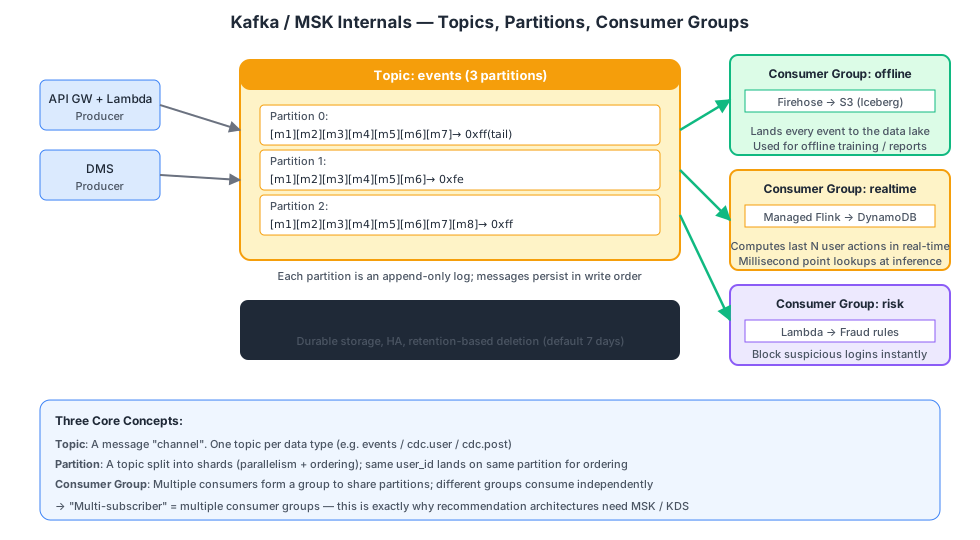
What Is MSK?#
Amazon MSK = Managed Streaming for Apache Kafka — an AWS-managed Apache Kafka cluster.
Core model (understand these three concepts and you understand Kafka):
| Concept | Analogy |
|---|---|
| Topic | A channel (one type of data), e.g., events / cdc.user |
| Partition | A topic split into N shards to increase parallelism; messages within the same partition are ordered |
| Consumer Group | A group of consumers that divide partitions among themselves; different groups are completely independent |
The essence of “multi-subscriber”: create multiple consumer groups, and the same data is consumed independently by each group at its own pace.
MSK Deployment Modes#
| Mode | Characteristics | Pricing |
|---|---|---|
| MSK Provisioned | You choose broker instance type, AZs, and count; maximum flexibility | Per instance + storage |
| MSK Serverless | Auto-scales; hands-off, but slightly fewer features | Per partition + throughput |
| MSK Connect | Managed Kafka Connect for running various connectors | Per worker instance |
For an event tracking scenario with hundreds of millions of daily events, Provisioned with three m7g.large brokers across 3 AZs costs approximately $400-500/month.
Kinesis Data Streams (KDS)#
KDS is AWS’s proprietary “Kafka-like” streaming service (predates MSK).
MSK vs KDS comparison:
| MSK | KDS | |
|---|---|---|
| Protocol | Apache Kafka | AWS proprietary |
| Ecosystem | Full Kafka ecosystem (Flink, Spark, Connect, KSQL) | AWS-native (Lambda, Firehose, Flink) |
| Learning curve | Medium (requires Kafka knowledge) | Low (simple API) |
| Operations | Provisioned requires broker management; Serverless is hands-off | Fully serverless |
| Cost (100M daily events) | Slightly lower | Slightly higher |
| Ordering guarantee | Ordered within same partition | Ordered within same shard |
How to choose:
- Team is familiar with Kafka or uses Flink downstream → MSK
- Fully AWS-native and want serverless → KDS
- When daily volumes are comparable (under a few billion), costs are similar — choose based on team familiarity
Schema Registry (Essential for Event Tracking)#
With 50 event types, each with different fields — without schema management, chaos is guaranteed.
AWS Glue Schema Registry:
- Centralized registration of Avro / JSON Schema for each topic
- Producers validate before writing
- Consumers parse on read
- Supports Schema Evolution (compatibility checks)
Complete Improved Architecture#
┌─────────────┐
│ Client SDK  │
└──────┬──────┘
       ▼
┌─────────────┐    ┌───────────┐
│ API Gateway │───▶│  Lambda   │ Auth + Enrichment (server_ts, geo, ip)
│ (HTTP API)  │    └─────┬─────┘
└─────────────┘          │
                         ▼
                  ┌─────────────┐
                  │  MSK Topic  │ events (12 partitions, across 3 AZs)
                  │  (events)   │
                  └──┬──┬──┬───┘
       ┌─────────────┘  │  └────────────────┐
       ▼                ▼                   ▼
  ┌─────────┐    ┌────────────┐      ┌──────────────┐
  │Firehose │    │Managed     │      │Lambda (Fraud │
  │  → S3   │    │Flink       │      │ Detection)   │
  │(offline)│    │→ DynamoDB  │      │              │
  └─────────┘    └────────────┘      └──────────────┘
Decision Table: What to Consider for a New Data Source#
| Step | Question | Decision |
|---|---|---|
| 1 | Is it Aurora / RDS MySQL? | Yes → Zero-ETL to Lakehouse; No → next step |
| 2 | Is it a DMS-supported source? | Yes → DMS; No → next step |
| 3 | Is it ES / OpenSearch? | Yes → OSI (managed) / Logstash (self-hosted) |
| 4 | Is it streaming events (tracking / logs)? | Yes → API GW + (MSK) + Firehose |
| 5 | None of the above? | Lambda / Glue Job custom ETL |
Chapter Summary#
| Pipeline | Key Services | One-Liner |
|---|---|---|
| Aurora MySQL to S3 | Zero-ETL to Lakehouse | Sub-second + serverless + direct Iceberg output |
| Self-hosted MySQL to S3 | DMS-based Zero-ETL | The Zero-ETL path for self-managed databases |
| Heterogeneous sources to S3 | Traditional DMS | Supports 60+ databases; requires managing a replication instance |
| ES to S3 | OpenSearch Ingestion / Logstash | DMS does not support ES as a source |
| Event tracking to S3 + real-time | API GW + MSK + Firehose + Flink | Multi-subscriber fan-out with offline + real-time dual paths |
Next up: once data is in S3, how do you make Athena and Spark recognize it as “tables”?
References
- Apache Kafka documentation — Apache
- Amazon Kinesis Data Streams — AWS Documentation
- Debezium — Debezium
Frequently asked
What is CDC and why is it better than polling for data ingestion?
When should I use Aurora Zero-ETL vs AWS DMS?
Read next
- Video Streaming
I Self-Hosted MiniMax H3 on an L40S: What Is Actually Open
MiniMax H3 runs on a 48 GB L40S with INT8 weights, but H3-Base is only the middle stage. Here is what worked, what failed, what it cost, and when self-hosting wins.
- Video Streaming
VOD Deep Dive Part 12: Building VOD on AWS — Services, Architecture, and Costs
Complete AWS VOD reference: MediaConvert, MediaPackage, CloudFront, S3, Step Functions, SPEKE DRM integration, Terraform IaC, real cost breakdowns, common pitfalls, and a production roadmap.
- Cloud Architecture
5 Pitfalls of Logging Failed Requests with CloudFront + Lambda@Edge
We built a dual Lambda@Edge setup for full request logging on CloudFront. Here are the 5 things that went wrong.
- Coding Tools
Building an Enterprise Agentic AI Platform with Kiro and AWS
We built a full AI agent platform in one week using Kiro IDE — zero hand-written code. Here's exactly how, including the parts that needed rework.
Get new posts by email
One email when a new article goes up. No ads, unsubscribe in one click.
Your address is used for post notifications only.
Discussion
Comments are GitHub Discussions on this repository; sign in with GitHub to post.