Big Data on AWS Deep Dive (Part 9): SageMaker and the ML Platform — From Training to Production
A complete tour of SageMaker AI: Studio notebooks, Feature Store, Training Jobs, real-time Endpoints, Model Monitor, and how it all fits into the recommendation system MLOps workflow.
Data is ready, features are computed, the online serving layer is built — now it is time to train and deploy models. This is where Amazon SageMaker takes the stage.
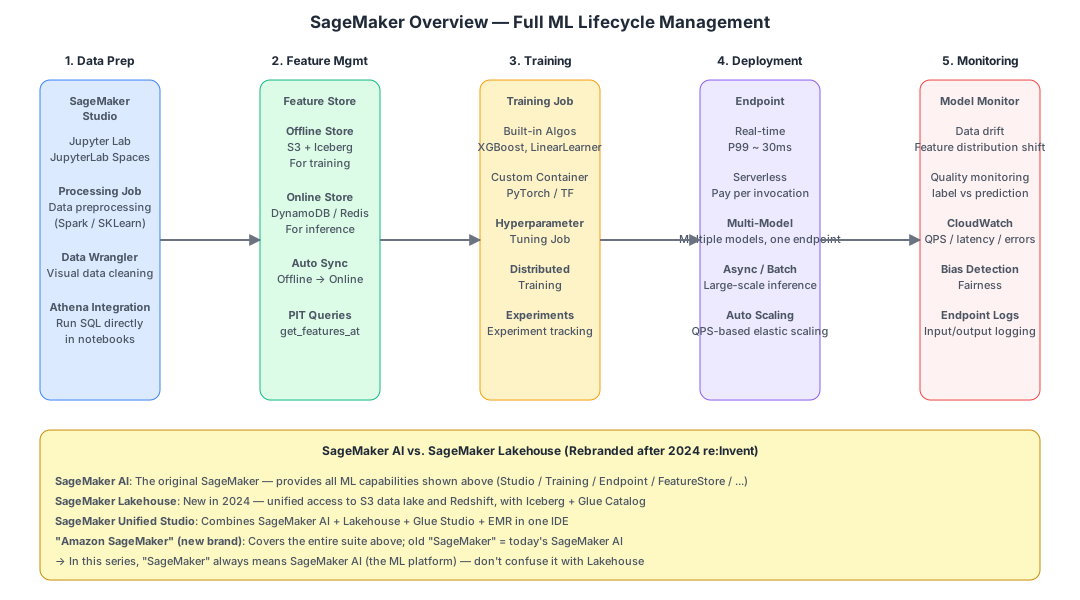
This chapter explains SageMaker as an umbrella product: SageMaker is not a single service — it is a collection of sub-services covering the entire ML lifecycle.
What Is SageMaker#
One-Sentence Definition#
Amazon SageMaker = AWS’s fully managed ML platform for the entire workflow. Everything you need for ML — data exploration, feature engineering, training, hyperparameter tuning, deployment, and monitoring — can be done within a single AWS service.
Naming Changes (Easy to Confuse — Post-2024 re:Invent Structure Through 2026)#
| Name | Meaning | Status (2026-05) |
|---|---|---|
| SageMaker AI | The original SageMaker. All ML/FM training and inference capabilities discussed in this chapter belong here | GA |
| SageMaker Lakehouse | Unified access to S3 + Redshift + federated data sources | GA |
| SageMaker Unified Studio | Unified IDE combining AI + Lakehouse + Glue Studio + EMR Notebook + Bedrock IDE | 2025 GA |
| SageMaker Catalog | Governance layer based on DataZone (data + models + projects) | GA |
| Amazon SageMaker (new brand) | The umbrella covering all four pillars above | — |
When we say “SageMaker” we typically mean SageMaker AI (the ML platform). The Lakehouse piece was already covered in Parts 2-4 (S3 + Iceberg + Glue Catalog).
2025-2026 additions: Unified Studio GA, Q Developer embedded in the IDE, Bedrock Foundation Models callable directly from SageMaker Studio, HyperPod task governance and flexible training plans.
The 5 Core Capabilities of SageMaker#
Data Preparation: Studio and Processing Jobs#
SageMaker Studio is a browser-based JupyterLab environment integrated with AWS services.
- Write Python notebooks, run
wr.athena.read_sql_query(...)to query data directly - Integrated Spark / SKLearn containers
- JupyterLab Spaces: isolated environments per user
Processing Job runs data preprocessing scripts:
- Spins up EC2, runs your Python script, tears down when finished
- Ideal for: feature generation, ETL, data cleansing
- Similar to EMR but more lightweight (no Spark cluster needed)
from sagemaker.sklearn.processing import SKLearnProcessor

processor = SKLearnProcessor(
    role=role, instance_type='ml.m5.xlarge', instance_count=2,
)
processor.run(
    code='preprocess.py',
    inputs=[ProcessingInput(source='s3://.../sample/', destination='/opt/ml/processing/input/')],
    outputs=[ProcessingOutput(source='/opt/ml/processing/output/', destination='s3://.../processed/')],
)
Feature Management: SageMaker Feature Store#
This is especially important for recommendation scenarios.
The Problem: Training and inference must maintain feature consistency.
- During training you use feature X read from
ads_user_features - At serving time inference also needs the same feature X, but via a DynamoDB point lookup
- Field names, encoding, and default values on both sides must be identical — manual synchronization is extremely error-prone
The Feature Store Solution:
Define a Feature Group:
  user_features:
    - user_id (record id)
    - event_time (event time)
    - age, city, ctr_7d, last_5_clicks, ...
        |
        | ingest()
        v
  +-----------------------------+
  | Offline Store (S3+Iceberg)  |  <-- Read during training, auto PIT queries
  | Online Store (DynamoDB)     |  <-- Read at inference, millisecond latency
  +-----------------------------+
        ^
        | auto sync
Key characteristics:
- Offline Store: S3 + Iceberg, automatically partitioned by event_time
- Online Store: Built-in KV (DynamoDB-like, fully managed by AWS)
- Auto Sync: Write to Offline -> immediately synced to Online
- PIT Queries:
get_features_at(event_time)automatically retrieves the snapshot at that point in time
Feature Store vs. Self-Built (DynamoDB + Iceberg):
| Feature Store | Self-Built | |
|---|---|---|
| Online/Offline consistency | Automatic | Maintain sync jobs yourself |
| PIT queries | One API call | Write Iceberg time travel SQL yourself |
| Flexibility | Medium (schema constrained by framework) | High |
| Cost | Slightly more expensive | Cheaper |
Recommendation: In the POC phase, self-build (DynamoDB + Iceberg); switch to Feature Store when productionizing. For complex scenarios, start with Feature Store from day one.
Official docs: https://docs.aws.amazon.com/sagemaker/latest/dg/feature-store.html
Training: Training Jobs#
Built-in Algorithms#
AWS provides 17+ built-in algorithms (XGBoost / LinearLearner / FactorizationMachine / KMeans / common deep learning):
from sagemaker.xgboost.estimator import XGBoost

xgb = XGBoost(
    entry_point='train.py',
    instance_type='ml.m5.2xlarge',
    instance_count=1,
    role=role,
    framework_version='1.7-1',
)
xgb.fit({'train': 's3://.../train/', 'val': 's3://.../val/'})
Custom Containers#
PyTorch / TensorFlow / JAX all have official containers; for custom code and libraries:
from sagemaker.pytorch import PyTorch

estimator = PyTorch(
    entry_point='train_two_tower.py',
    framework_version='2.1.0',
    instance_type='ml.g5.xlarge',  # GPU
    role=role,
    hyperparameters={'lr': 0.001, 'embedding_dim': 64},
)
estimator.fit({'train': 's3://.../sample/'})
Hyperparameter Tuning#
Automatic tuning (Bayesian optimization / grid / random):
from sagemaker.tuner import HyperparameterTuner, ContinuousParameter

tuner = HyperparameterTuner(
    estimator=xgb,
    objective_metric_name='validation:auc',
    hyperparameter_ranges={'eta': ContinuousParameter(0.01, 0.5)},
    max_jobs=20, max_parallel_jobs=4,
)
tuner.fit(...)
Distributed Training#
Data parallelism / model parallelism / pipeline parallelism across multiple machines and GPUs.
Pricing#
Billed per training instance type + duration, per-second billing. Stop training and billing stops immediately.
- ml.m5.xlarge: ~$0.23/hour
- ml.g5.xlarge (GPU): ~$1.4/hour
- ml.p4d.24xlarge (8x A100): ~$32/hour
Official docs: https://docs.aws.amazon.com/sagemaker/latest/dg/train-model.html
Deployment: Endpoints#
After training, the model is saved to S3 and deployed to an Endpoint for online inference.
Real-Time Endpoint#
Launches EC2 + loads model + exposes HTTP API:
predictor = xgb.deploy(
    initial_instance_count=2,
    instance_type='ml.m5.xlarge',
    endpoint_name='rank-model-v1',
)

# Invoke
result = predictor.predict({'features': [...]})
Characteristics:
- P99 ~ 30-50ms (including network)
- 24x7 online, billed per instance-hour
- Supports Auto Scaling (automatically adds nodes as QPS increases)
Serverless Inference#
Pay-per-invocation, no cost when idle:
from sagemaker.serverless import ServerlessInferenceConfig

predictor = model.deploy(
    serverless_inference_config=ServerlessInferenceConfig(
        memory_size_in_mb=4096, max_concurrency=20,
    )
)
Cold start has a few seconds of latency — not suitable for the recommendation hot path (which requires stable millisecond latency).
Multi-Model Endpoint (MME)#
A single Endpoint loads N models (lazy-loaded on demand), ideal for long-tail models (each with low individual QPS).
Async Endpoint / Batch Transform#
Batch inference (e.g., scoring all users site-wide once per day).
A/B Testing in Endpoints#
An Endpoint can host multiple Production Variants with traffic split by weight:
predictor.update_endpoint(
    initial_instance_count=2, instance_type='ml.m5.xlarge',
    new_endpoint_config_name='ab-test-config',
    # variant A 90% + variant B 10%
)
This makes gradual (Canary) model rollouts very friendly.
Official docs: https://docs.aws.amazon.com/sagemaker/latest/dg/deploy-model.html
Monitoring: Model Monitor#
After a model goes online, the most important thing is not speed but sustained quality. Model Monitor tracks:
| Monitor Type | What It Detects |
|---|---|
| Data Quality | Whether input feature distributions have drifted (concept drift) |
| Model Quality | Prediction vs. actual label AUC / error |
| Bias Drift | Prediction fairness across different user groups |
| Feature Attribution | Whether feature importance remains stable |
Outputs alarms -> CloudWatch -> Slack / email. When drift is detected, it can automatically trigger retraining.
Official docs: https://docs.aws.amazon.com/sagemaker/latest/dg/model-monitor.html
Customer Scenario: SageMaker Usage Patterns#
Two-Tower Recall Model#
# Training (SageMaker Training Job)
PyTorch(
    entry_point='train_two_tower.py',
    instance_type='ml.g5.xlarge',
    role=role,
).fit({'train': 's3://.../ads_sample_follow/'})

# Output:
#   user_tower.pt      (user tower weights)
#   item_tower.pt      (item tower weights)

# Item embedding offline pre-computation (Processing Job)
SKLearnProcessor(...).run(
    code='compute_item_embedding.py',
    # Load item_tower.pt, compute vectors for all items on the platform
    # Output: item_id, embedding[64]
    outputs=[ProcessingOutput(destination='s3://.../item_embeddings/')]
)

# Write to OpenSearch k-NN (via Glue Job or Lambda)

# Deploy user_tower as an Endpoint
PyTorchModel(model_data='s3://.../user_tower.tar.gz').deploy(
    instance_type='ml.m5.xlarge', initial_instance_count=2,
    endpoint_name='user-tower-encoder',
)
# Recommendation service calls -> compute user vector in real-time -> query OpenSearch
LightGBM Ranking Model#
# Training
SKLearn(
    entry_point='train_lgb.py',
    instance_type='ml.m5.4xlarge',
).fit({'train': 's3://.../ads_sample_ctr/'})

# Deployment
predictor = SKLearnModel(...).deploy(
    instance_type='ml.c5.xlarge', initial_instance_count=4,
    endpoint_name='rank-lgb-v1',
)

# Recommendation service scores each candidate
scores = predictor.predict(features_for_50_candidates)
End-to-End Orchestration#
MWAA DAG:
  04:00 SageMaker Training: train_recall_two_tower
  04:00 SageMaker Training: train_rank_lgb
  05:00 SageMaker Processing: compute_item_embeddings
  05:30 Glue Job: write item_embeddings -> OpenSearch
  06:00 Lambda: deploy new endpoints (Canary 10%)
  10:00 Lambda: ramp up to 50%
  14:00 Lambda: full traffic
SageMaker and Bedrock in the GenAI Era (2026 Status)#
Although the customer scenario is classic recommendation rather than LLM, the AWS GenAI stack is mature by 2025-2026. Here is the full landscape for future reference when you need RAG / Agents / content generation:
SageMaker AI Side (Self-Train and Self-Deploy)#
- JumpStart: Open-source model marketplace (Llama 3 / Mistral / Stable Diffusion / DeepSeek etc.), one-click deployment
- HyperPod: Large model training clusters (thousand-GPU scale); 2025 adds task governance + flexible training plans (reserve GPU capacity by time slot)
- Inference Components: Multiple models share the same GPU instance, dramatically reducing long-tail LLM deployment costs
- MLflow on SageMaker: Managed MLflow for experiment tracking
Amazon Bedrock Side (API-Based Model Access)#
| Capability | Description |
|---|---|
| Foundation Models | Claude 4 series / Llama 3.x / Mistral / Cohere / Amazon Nova (Micro/Lite/Pro/Premier text + Canvas image + Reel video) |
| Bedrock Knowledge Bases | Managed RAG supporting S3 Vectors / OpenSearch / Aurora pgvector backends, structured data retrieval |
| Bedrock AgentCore + Agent Registry | New in 2025, managed Agent runtime + central registry for multi-agent / tool calling |
| Bedrock Guardrails | Content safety + PII filtering |
| Bedrock Prompt Management / Flows | Prompt versioning + visual orchestration |
Amazon Q#
- Q Developer: AI coding assistant embedded in the IDE (integrated into SageMaker Unified Studio)
- Q in QuickSight: BI natural language queries, Scenarios (What-if analysis), auto-generated Topics
- Q Business: Enterprise knowledge base Q&A
For the customer’s social app, if they later need “AI comment generation / content moderation / intelligent customer service,” start from Bedrock; if they need private LLM fine-tuning, use SageMaker HyperPod.
Feature Store: To Use or Not to Use#
This decision often causes debate in customer scenarios. Here is a decision framework:
| Situation | Choice |
|---|---|
| Team < 5 people, only 1-2 models | Do not use — self-built DynamoDB + Iceberg is more lightweight |
| Models > 5, strong feature reuse | Use it — avoid duplicating feature definitions |
| Multi-team collaboration | Use it — provides a unified registry |
| Strict online/offline consistency requirements | Use it |
| Extreme performance / cost sensitivity | Do not use — self-built allows finer tuning |
For the POC phase with 1-2 models, self-build first to prove business value, then switch to Feature Store.
Chapter Summary#
| Sub-Service | Role |
|---|---|
| Studio / Notebook | Data exploration + model experimentation |
| Processing Job | Data preprocessing (lightweight ETL) |
| Feature Store | Online/offline consistent feature platform |
| Training Job | Managed model training (per-second billing) |
| Hyperparameter Tuning | Automated hyperparameter optimization |
| Endpoint | Online inference (Real-time / Serverless / Async / MME) |
| Model Monitor | Data / quality drift monitoring |
| JumpStart | One-click open-source model deployment (for GenAI) |
The core value of SageMaker: let ML engineers focus on models, not infrastructure.
Next chapter assembles all components into the final architecture with cost estimates.
References
- Amazon SageMaker Developer Guide — AWS Documentation
- Amazon SageMaker Feature Store — AWS Documentation
Frequently asked
What is the difference between SageMaker AI and SageMaker Lakehouse?
How does SageMaker Feature Store handle both training and serving?
Read next
- Video Streaming
I Self-Hosted MiniMax H3 on an L40S: What Is Actually Open
MiniMax H3 runs on a 48 GB L40S with INT8 weights, but H3-Base is only the middle stage. Here is what worked, what failed, what it cost, and when self-hosting wins.
- Video Streaming
VOD Deep Dive Part 12: Building VOD on AWS — Services, Architecture, and Costs
Complete AWS VOD reference: MediaConvert, MediaPackage, CloudFront, S3, Step Functions, SPEKE DRM integration, Terraform IaC, real cost breakdowns, common pitfalls, and a production roadmap.
- Cloud Architecture
5 Pitfalls of Logging Failed Requests with CloudFront + Lambda@Edge
We built a dual Lambda@Edge setup for full request logging on CloudFront. Here are the 5 things that went wrong.
- Coding Tools
Building an Enterprise Agentic AI Platform with Kiro and AWS
We built a full AI agent platform in one week using Kiro IDE — zero hand-written code. Here's exactly how, including the parts that needed rework.
Get new posts by email
One email when a new article goes up. No ads, unsubscribe in one click.
Your address is used for post notifications only.
Discussion
Comments are GitHub Discussions on this repository; sign in with GitHub to post.