How to Design a Full-Site Search Engine with Elasticsearch
Multi-source indexing, CDC sync, permission-aware search, hot keywords, and typeahead — a complete Elasticsearch architecture guide.
Building a full-site search engine sounds like a well-trodden path — until you face the real-world constraints: multiple data sources (relational databases and third-party APIs), documents in various formats (HTML, PDF, Word, Excel, PowerPoint), fine-grained permission filtering, hot keyword ranking with time decay, and typeahead suggestions. This article walks through a production design that addresses all of these concerns using Elasticsearch 8.x as the core search engine.
Requirements Overview#
The search engine must support four core features:
- Keyword search — full-text search across titles and body content, with hit highlighting, configurable source-priority weighting, relevance and time-based sorting, and per-user permission filtering.
- Multi-source mixed ranking — results from our own Elasticsearch index must be merged with results from third-party APIs, sorted by a unified relevance score, with correct pagination across both sources.
- Hot keyword ranking — a daily-updated leaderboard of trending search terms with a time-decay formula so that stale terms naturally fade.
- Typeahead suggestions — as-you-type completion powered by the Elasticsearch Completion Suggester.
Architecture#
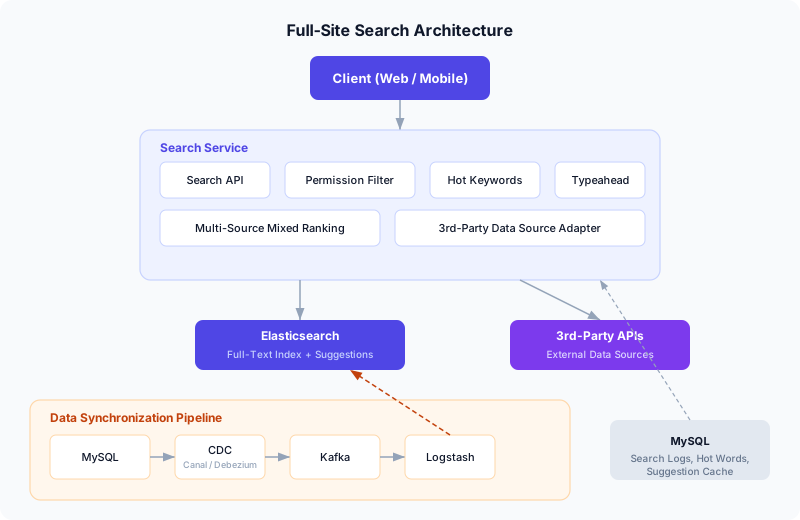
The system is divided into two major layers:
Search Service handles all query-time logic: the Search API that clients call, permission-aware filtering, hot keyword retrieval, typeahead suggestions, and the mixed-ranking engine that merges results from Elasticsearch and external APIs.
Data Synchronization Pipeline keeps Elasticsearch in near-real-time sync with the authoritative MySQL database using CDC (Change Data Capture) via binlog parsing. A schema transformer converts raw change events into the Elasticsearch document format before indexing.
Search behavior logs (query terms, timestamps, user IDs) are written to MySQL and used by a daily batch job to compute hot keywords and suggestion candidates.
Technology Choices#
3.1 Search Engine: Elasticsearch 8.x#
Elasticsearch remains the most mature, actively maintained open-source full-text search engine. For cloud deployments, Amazon OpenSearch Service provides a managed alternative that is API-compatible with Elasticsearch and removes the operational burden of cluster management.
Key configuration notes:
- Enable the IK Analysis plugin for CJK (Chinese/Japanese/Korean) tokenization. If you need fine-grained Chinese segmentation, use
ik_max_wordat index time andik_smartat search time. - Budget heap memory carefully. Heavy analyzer plugins can cause OOM on small instances — plan for at least 8 GB of JVM heap in production.
3.2 Document Extraction#
Documents stored as binary files (PDF, Word, Excel, PowerPoint) need to be converted to plain text for indexing. The main options:
| Tool | Approach | Trade-off |
|---|---|---|
| Apache Tika | Java library, widest format support | Needs JVM; complex layouts may lose fidelity |
| Ingest Attachment | ES plugin wrapping Tika | Tightly integrated, but runs inside ES nodes |
| FsCrawler | Standalone file-system crawler | Good for batch; not suitable for streaming |
| Cloud APIs | AWS Textract, Azure AI Document Intelligence | Pay-per-page; best accuracy for scanned docs |
For a streaming architecture, the recommended approach is to call a document-extraction service (Tika or a cloud API) inside the schema transformer before writing to Elasticsearch. This keeps the extraction logic decoupled from both the application and ES itself.
3.3 Data Synchronization: Binlog-Based CDC#
There are four common patterns for syncing MySQL data to Elasticsearch:
| Pattern | Pros | Cons |
|---|---|---|
| Synchronous dual-write | Lowest latency | Tight coupling; partial-failure risk |
| Async dual-write (via MQ) | Decoupled writes | Application must publish events |
| Periodic batch ETL | Zero app changes | High latency; polling load on MySQL |
| Binlog CDC | Near-real-time; zero app changes; consistent | Requires CDC tooling |
Binlog CDC is the recommended approach because it is transparent to the application, provides near-real-time latency, and guarantees that every committed change is captured exactly once.
CDC Tool Selection#
The two most widely-used open-source CDC connectors are:
- Canal (Alibaba) — a mature Java-based tool that masquerades as a MySQL replica to receive binlog events. It has a large user base in the Chinese tech ecosystem and supports Kafka, RocketMQ, and custom downstream adapters.
- Debezium (Red Hat) — a Kafka Connect-based CDC platform that supports MySQL, PostgreSQL, MongoDB, and many other databases. It provides a richer event format (before/after snapshots), built-in schema evolution handling, and is the standard choice in Kafka-centric architectures.
For AWS-native deployments, AWS Database Migration Service (DMS) can stream CDC events from RDS MySQL to Amazon MSK (Kafka), Amazon OpenSearch, or S3 with minimal configuration.
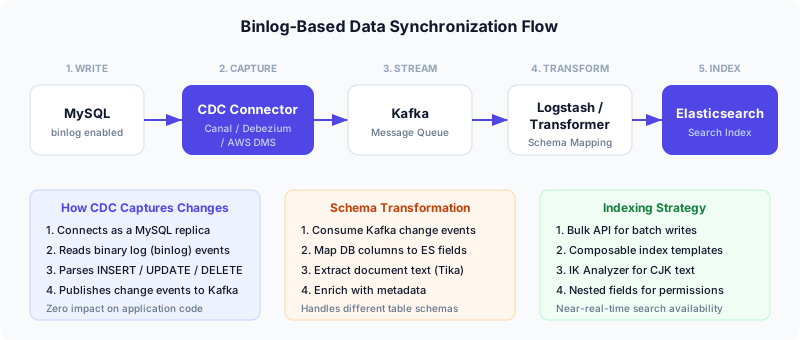
The pipeline works as follows:
- MySQL writes binlog events for every committed transaction.
- The CDC connector (Canal, Debezium, or AWS DMS) reads the binlog stream by posing as a MySQL replica.
- Change events are published to a Kafka topic, one event per row change.
- A schema transformer (Logstash, a custom service, or Kafka Streams) consumes the events, maps database columns to Elasticsearch fields, optionally extracts document text, and produces a new Kafka topic with ES-ready JSON documents.
- Logstash (or a custom consumer) reads from the output topic and calls the Elasticsearch Bulk API to index the documents.
Index Design#
4.1 Full-Text Search Index Template#
Elasticsearch 8.x uses composable index templates (_index_template) rather than the legacy _template API. Here is the full-text search template:
PUT _index_template/template_fulltext
{
  "index_patterns": ["fulltext-*"],
  "template": {
    "settings": {
      "number_of_shards": 1,
      "number_of_replicas": 1,
      "analysis": {
        "analyzer": {
          "ik_index_analyzer": {
            "type": "custom",
            "tokenizer": "ik_max_word"
          },
          "ik_search_analyzer": {
            "type": "custom",
            "tokenizer": "ik_smart"
          }
        }
      }
    },
    "mappings": {
      "properties": {
        "title": {
          "type": "text",
          "analyzer": "ik_index_analyzer",
          "search_analyzer": "ik_search_analyzer"
        },
        "summary": {
          "type": "text",
          "analyzer": "ik_index_analyzer",
          "search_analyzer": "ik_search_analyzer"
        },
        "content": {
          "type": "text",
          "analyzer": "ik_index_analyzer",
          "search_analyzer": "ik_search_analyzer"
        },
        "author": {
          "type": "keyword"
        },
        "document_type": {
          "type": "keyword"
        },
        "url": {
          "type": "keyword"
        },
        "publish_date": {
          "type": "date"
        },
        "update_date": {
          "type": "date"
        },
        "privilege": {
          "properties": {
            "data": {
              "type": "nested",
              "properties": {
                "type": {
                  "type": "keyword"
                },
                "id": {
                  "type": "keyword"
                }
              }
            }
          }
        }
      }
    }
  }
}
Note: The legacy
PUT _template/template_nameAPI is deprecated in ES 7.8+ and removed in ES 9. Always usePUT _index_template/template_namewith composable templates for ES 8.x and above.
4.2 Suggestion Index Template#
The typeahead index uses the completion field type:
PUT _index_template/template_suggest
{
  "index_patterns": ["suggest-*"],
  "template": {
    "settings": {
      "number_of_shards": 1
    },
    "mappings": {
      "properties": {
        "suggest": {
          "type": "completion"
        },
        "weight": {
          "type": "integer"
        }
      }
    }
  }
}
Permission-Aware Search#
In enterprise search, different users see different documents. There are two strategies:
| Strategy | When to Filter | Trade-off |
|---|---|---|
| Pre-retrieval filtering | At query time (ES filter clause) | Best performance; more complex queries |
| Post-retrieval filtering | After ES returns results | Simpler queries; wastes retrieval budget |
For high-performance search, pre-retrieval filtering is strongly preferred. We embed permission data directly in the document as a nested field:
{
  "title": "Q3 Financial Report",
  "content": "...",
  "privilege": {
    "data": [
      { "type": "staff", "id": "user-1234" },
      { "type": "department", "id": "dept-finance" },
      { "type": "department", "id": "dept-executive" }
    ]
  }
}
Each entry in privilege.data represents an entity (user or department) that is allowed to view the document. A user should see a document if they match any of the privilege entries — either their own user ID appears as a staff entry, or their department ID appears as a department entry.
The Permission Filter Query (Corrected)#
The correct query uses a bool.should (OR) between the staff and department nested queries:
GET /fulltext-*/_search
{
  "query": {
    "bool": {
      "must": [
        {
          "multi_match": {
            "query": "financial report",
            "fields": ["title^3", "summary^2", "content"]
          }
        }
      ],
      "filter": [
        {
          "bool": {
            "should": [
              {
                "nested": {
                  "path": "privilege.data",
                  "query": {
                    "bool": {
                      "must": [
                        { "term": { "privilege.data.type": "staff" } },
                        { "term": { "privilege.data.id": "user-1234" } }
                      ]
                    }
                  }
                }
              },
              {
                "nested": {
                  "path": "privilege.data",
                  "query": {
                    "bool": {
                      "must": [
                        { "term": { "privilege.data.type": "department" } },
                        { "term": { "privilege.data.id": "dept-finance" } }
                      ]
                    }
                  }
                }
              }
            ],
            "minimum_should_match": 1
          }
        }
      ]
    }
  },
  "highlight": {
    "fields": {
      "title": {},
      "content": { "fragment_size": 200 }
    }
  }
}
Bug fix note: A common mistake is to place the two nested queries as separate items in the
filterarray, which applies an AND — meaning the user must match both a staff entry and a department entry. This causes most documents to be filtered out. The correct approach wraps them in abool.shouldwithminimum_should_match: 1, so matching either condition is sufficient.
Multi-Source Mixed Ranking and Pagination#
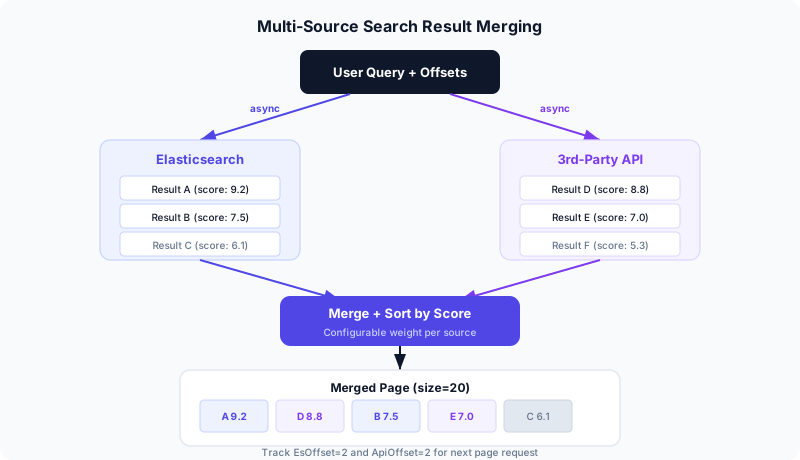
This is the most architecturally interesting part of the system. When search results come from both Elasticsearch (scored by BM25) and a third-party API (scored by its own algorithm), we need to:
- Query both sources concurrently — use async/parallel calls to avoid sequential latency.
- Normalize scores — either rescale third-party scores to the ES score range, or apply configurable weights per source (e.g., ES results get a 1.2x multiplier).
- Merge and sort — interleave results by descending score to produce a single, unified page.
- Track per-source offsets — since we consume a different number of items from each source per page, we need dual cursors.
6.1 The Dual-Offset Pagination Algorithm#
Standard offset-based pagination (from + size) breaks when results come from two independent sources. The solution is to track two independent offsets — one for each source — and let the merge process determine how many items from each source appear on each page.
# Pseudocode for the mixed-ranking search endpoint

async def search(query: str, es_offset: int, api_offset: int, page_size: int):
    # 1. Fetch from both sources in parallel
    es_results, api_results = await asyncio.gather(
        search_elasticsearch(query, offset=es_offset, limit=page_size),
        search_third_party(query, offset=api_offset, limit=page_size),
    )

    # 2. Merge by score (descending)
    merged = []
    es_used, api_used = 0, 0
    es_idx, api_idx = 0, 0

    while len(merged) < page_size:
        es_item = es_results[es_idx] if es_idx < len(es_results) else None
        api_item = api_results[api_idx] if api_idx < len(api_results) else None

        if es_item is None and api_item is None:
            break

        if api_item is None or (es_item and es_item.score >= api_item.score):
            merged.append(es_item)
            es_idx += 1
            es_used += 1
        else:
            merged.append(api_item)
            api_idx += 1
            api_used += 1

    return {
        "results": merged,
        "es_offset": es_offset,
        "api_offset": api_offset,
        "es_used": es_used,
        "api_used": api_used,
        "es_has_next": es_results.has_more,
        "api_has_next": api_results.has_more,
    }
6.2 Client-Side Pagination State#
The frontend maintains an array of offset snapshots — one entry per page visited:
interface PageState {
  esOffset: number;
  apiOffset: number;
}

// Initialize
const pageHistory: PageState[] = [{ esOffset: 0, apiOffset: 0 }];

// After receiving page results:
function onNextPage(response: SearchResponse) {
  const nextState: PageState = {
    esOffset: response.es_offset + response.es_used,
    apiOffset: response.api_offset + response.api_used,
  };
  pageHistory.push(nextState);
}

// Go to previous page:
function onPrevPage() {
  pageHistory.pop();  // remove current
  const prev = pageHistory[pageHistory.length - 1];
  // re-fetch with prev.esOffset, prev.apiOffset
}
Walkthrough example with page_size = 20:
| Page | Request | Response | State |
|---|---|---|---|
| 1 | esOffset=0, apiOffset=0 | es_used=7, api_used=13 | [{0,0}] |
| 2 | esOffset=7, apiOffset=13 | es_used=12, api_used=8 | [{0,0}, {7,13}] |
| Back to 1 | Pop {7,13} → re-fetch {0,0} | Same as page 1 | [{0,0}] |
This approach sacrifices random-access page jumping (you cannot jump to page 5 directly), but it handles the fundamental complexity of merging two independent result streams with correct, deterministic pagination. For most search UIs, previous/next navigation is sufficient.
Hot Keyword Ranking with Time Decay#
A naive hot-keyword implementation simply counts search frequency over a fixed window (e.g., the last 30 days). But this creates a problem: a keyword searched 101 times ten days ago will outrank one searched 100 times yesterday, even though the latter is clearly more “hot” right now.
The solution is a linear time-decay formula that gives more weight to recent searches.
7.1 The Decay Formula#
Given:
- T = the size of the time window (e.g., 30 days)
- c_i = the search count on day i, where i = 0 is yesterday and i = T-1 is the oldest day
- w = base weight (default 1.0)
The hot score for a keyword is:
hot = (w / T) × Σ (T - i) × cᵢ for i = 0 to T-1Expanding for T = 30:
hot = (30 * c_0 + 29 * c_1 + 28 * c_2 + ... + 1 * c_29) / 30How it works: Yesterday’s searches (c_0) are multiplied by 30, the day before (c_1) by 29, and so on. Searches from 30 days ago (c_29) are multiplied by just 1. This creates a smooth linear decay where recent activity is worth up to 30x more than activity at the edge of the window.
7.2 Implementation#
from datetime import datetime, timedelta
from collections import defaultdict

def compute_hot_keywords(
    search_logs: list[dict],    # [{"keyword": str, "date": date}, ...]
    window_days: int = 30,
    top_n: int = 50,
    base_weight: float = 1.0,
) -> list[dict]:
    """Compute hot keyword scores with linear time decay."""
    today = datetime.utcnow().date()
    scores = defaultdict(float)

    for log in search_logs:
        keyword = log["keyword"]
        days_ago = (today - log["date"]).days
        if days_ago < 0 or days_ago >= window_days:
            continue

        # Linear decay: recent days get higher weight
        decay_factor = window_days - days_ago
        scores[keyword] += decay_factor * base_weight / window_days

    # Sort by score descending, take top N
    ranked = sorted(scores.items(), key=lambda x: -x[1])[:top_n]
    return [{"keyword": k, "score": round(s, 2)} for k, s in ranked]
The daily cron job computes these scores, stores the top N in MySQL (for manual curation — editors can pin, remove, or reorder terms), and caches the final list in Redis for sub-millisecond retrieval by the Search API.
7.3 Extensions#
- Synonym merging: Before scoring, normalize synonyms so that “ES”, “Elasticsearch”, and “elastic search” are counted as one keyword. A simple alias map or edit-distance threshold works for most cases.
- Burst detection: Add a multiplier for keywords whose daily count exceeds 2x the rolling average — this surfaces sudden spikes more aggressively.
- Exponential decay variant: Replace
(T - i)withe^{-lambda * i}for a sharper dropoff. The linear formula is simpler to explain and tune, but exponential decay is better at suppressing old-but-frequent terms.
Typeahead Suggestions with Completion Suggester#
Elasticsearch’s Completion Suggester is a purpose-built data structure (an FST — Finite State Transducer) optimized for prefix-based autocomplete. It lives entirely in memory and returns results in sub-millisecond time.
8.1 Indexing Suggestions#
A daily batch job computes the top 1000+ search terms from the last 90 days and writes them to the suggestion index:
POST suggest-v1/_doc
{
  "suggest": {
    "input": ["elasticsearch", "elastic search", "ES"],
    "weight": 85
  }
}
The input array allows multiple surface forms (including common misspellings) to map to the same suggestion. The weight field controls ranking — higher-weight suggestions appear first.
8.2 Querying Suggestions#
GET suggest-v1/_search
{
  "suggest": {
    "keyword-suggest": {
      "prefix": "elast",
      "completion": {
        "field": "suggest",
        "size": 10,
        "skip_duplicates": true
      }
    }
  }
}
This returns the top 10 suggestions whose input starts with “elast”, deduplicated and sorted by weight.
Putting It All Together: The Search API#
Here is a high-level view of the search endpoint that ties everything together:
@app.get("/api/search")
async def search(
    q: str,
    sort_by: str = "relevance",  # "relevance" or "date"
    es_offset: int = 0,
    api_offset: int = 0,
    page_size: int = 20,
    user: User = Depends(get_current_user),
):
    # 1. Build the ES query with permission filter
    es_query = build_search_query(
        keyword=q,
        user_id=user.id,
        department_id=user.department_id,
        sort_by=sort_by,
    )

    # 2. Query ES and third-party API concurrently
    es_results, api_results = await asyncio.gather(
        es_client.search(
            index="fulltext-*",
            body=es_query,
            from_=es_offset,
            size=page_size,
        ),
        third_party_client.search(q, offset=api_offset, limit=page_size),
    )

    # 3. Merge results by score
    merged = merge_and_rank(es_results, api_results, page_size)

    # 4. Log the search event (async, non-blocking)
    asyncio.create_task(log_search_event(user.id, q))

    return merged


@app.get("/api/search/hot")
async def hot_keywords():
    """Return cached hot keywords (refreshed daily by cron)."""
    cached = await redis.get("search:hot_keywords")
    if cached:
        return json.loads(cached)
    return await refresh_hot_keywords_from_db()


@app.get("/api/search/suggest")
async def suggest(prefix: str):
    """Typeahead suggestions via ES Completion Suggester."""
    result = await es_client.search(
        index="suggest-*",
        body={
            "suggest": {
                "keyword-suggest": {
                    "prefix": prefix,
                    "completion": {
                        "field": "suggest",
                        "size": 10,
                        "skip_duplicates": True,
                    }
                }
            }
        }
    )
    suggestions = [
        opt["text"]
        for opt in result["suggest"]["keyword-suggest"][0]["options"]
    ]
    return {"suggestions": suggestions}
Future Optimizations#
Data Quality#
- Document deduplication — use SimHash or MinHash to detect near-duplicate documents and merge them at index time.
- Content cleaning — strip boilerplate (navigation, footers, ads) from HTML documents before indexing.
- Source-level weight configuration — allow administrators to set per-index or per-source boosting factors without redeploying.
Search Quality#
- Custom dictionary management — augment the IK analyzer’s dictionary with domain-specific terms from the hot keyword table and manual curation.
- Synonym expansion — configure ES synonym token filters so that “K8s” matches “Kubernetes”.
- Spell correction — use the Phrase Suggester or a dedicated spell-check layer to handle typos.
- Click-through rate (CTR) tracking — log which results users actually click, and feed that signal back into relevance scoring via a
function_scorewrapper.
Infrastructure#
- Index lifecycle management (ILM) — automatically roll over, shrink, and delete old indices to control storage costs.
- Search relevance testing — use the ES Ranking Evaluation API to run automated relevance benchmarks as you tune analyzers and scoring.
- Observability — track p50/p95/p99 query latency, zero-result rate, and suggestion acceptance rate as key search health metrics.
References#
References
- Elasticsearch reference — Elastic
- IK Analysis plugin for Chinese — GitHub
- Elasticsearch text analyzers — Elastic
Frequently asked
How do you build a full-site search engine with Elasticsearch?
What is CDC sync for Elasticsearch and why use it?
How do you implement typeahead suggestions in Elasticsearch?
Elasticsearch vs Algolia: which should you choose?
Read next
- Tech Deep Dive
Building a Knowledge Base Search Engine with FSCrawler and Elasticsearch
Index PDFs, Word docs, and scanned files into Elasticsearch with FSCrawler. Covers OCR, custom mappings, and production setup.
- Big Data
Big Data on AWS Deep Dive (Part 3): Data Ingestion — DMS, Zero-ETL, Firehose, and MSK
Four data sources, four ingestion pipelines — learn CDC with DMS, Aurora Zero-ETL, Kafka on MSK, and Firehose micro-batching to land data into your S3 data lake.
- AI & Agent
How to Build a RAG System with LangChain and Elasticsearch
A hands-on guide to building Retrieval Augmented Generation — from vector embeddings to context-enhanced LLM answers.
- Cloud Architecture
How to Build API Monitoring with Grafana and Elasticsearch
Set up production API monitoring from scratch — Elasticsearch data source, Lucene queries, Grafana panels, and alerting rules.
Get new posts by email
One email when a new article goes up. No ads, unsubscribe in one click.
Your address is used for post notifications only.
Discussion
Comments are GitHub Discussions on this repository; sign in with GitHub to post.